


When I first started auditing content for answer engine visibility, I assumed the keyword research process was roughly the same as traditional SEO — just with a few tweaks. I was wrong.

Answer Engine Optimization (AEO) keyword research isn’t just about finding what people search. It’s about understanding what answer engines are asked, how they interpret those prompts, and which questions your content needs to answer directly and authoritatively. The entire mental model shifts from ranking to getting cited.
This guide breaks down exactly how to approach that shift, which tools actually help, and how to build a workflow that connects question discovery to published, AI-optimized content.
Table of Contents
How Keyword Research Differs for AEO vs. SEO
Traditional SEO keyword research is grounded in real user data: monthly search volume, keyword difficulty, and potential click-through rate. Tools like Ahrefs and Semrush surface what people type into Google, and you optimize content to rank for those terms.
AEO flips several of those assumptions.
SEO keyword research prioritizes:
- Monthly search volume
- Shorter, navigational, or transactional queries
- Ranking position in the 10 blue links
- Traffic is the primary success metric
AEO keyword research prioritizes:
- Question-based and conversational queries
- Fanout queries — the cluster of sub-questions a single prompt triggers
- Alignment with user intent at a semantic level, not just lexical match
- Visibility in Gemini, ChatGPT, Perplexity, and other answer engines
- Citation likelihood, not just ranking position
The practical difference is that when someone asks ChatGPT, “What’s the best CRM for a small marketing team?”, the model doesn’t return a ranked list of pages. Instead, it synthesizes an answer from content it has indexed and deemed authoritative.
Your job is to be the source the model trusts.
AEO keyword research tools help discover conversational and question-based queries that align with how users prompt answer engines. AEO tools differ from SEO tools in that they focus on answer engine visibility, prompt patterns, and answer-first content opportunities — not just search volume and backlinks.
Pro tip: Start your AEO keyword research by reading your own brand’s AI Overview appearances in Google. Search for your category (e.g., “best email marketing software”) and note which questions trigger AI-generated summaries.
Those are the AEO targets worth owning first.
Keyword Research Tools for AEO by Goal
There’s no single “AEO keyword tool.” The best stack combines traditional question-discovery tools with newer answer engine visibility trackers and synthetic query generators. Here’s how I categorize them, and which ones I’d actually use.
Traditional Keyword Research Tools
Traditional SEO tools are still essential for AEO, but you need to know how to use them differently. Rather than chasing high-volume head terms, I use these tools to isolate question-based queries, extract “People Also Ask” clusters, and identify long-tail prompts that map to conversational search behavior.
AEO keyword research builds on this foundation: these tools give you a baseline understanding of what people ask, which you can then expand through fanout analysis and AI prompt modeling.
Semrush
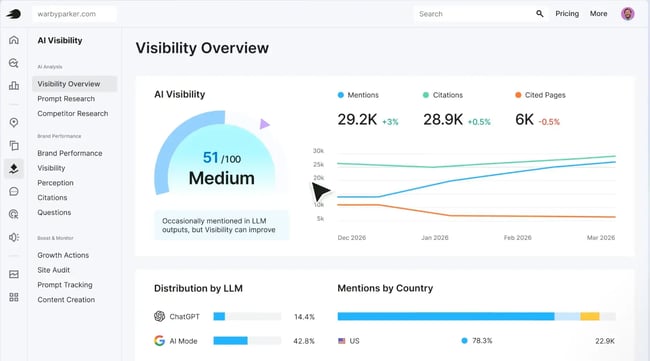
Semrush’s Keyword Magic Tool lets you filter by question-type queries (who, what, how, why, when), which is exactly the format AEO content needs to answer. I’ve found the “Questions” filter in Semrush particularly useful for identifying how a topic branches into multiple user intents — a precursor to fanout query mapping.
What we like: The Topic Research feature surfaces semantically related questions and subtopics in a visual card format, making it easy to spot content gaps around a core AEO theme.
Pro tip: Export Semrush’s “Questions” results for your top 5–10 seed keywords. This is your starting question inventory. From there, you can use fanout tools (covered below) to expand it into an AI-native set of prompts.
Best for: Enterprise teams that need breadth across question discovery, competitive gap analysis, and content optimization in one platform.
Ahrefs
Ahrefs’ Content Explorer and Site Explorer let you see which pages on competitor sites earn the most links and traffic — useful for identifying which AEO-style content (FAQs, guides, comparison pages) signals authority.
The “Questions” filter in Keywords Explorer is another solid source of conversational queries.
What we like: Ahrefs’ “Also rank for” report shows what else a page ranks for — great for uncovering the semantic neighborhood around your target AEO topics. See our roundup of the best tools to find long-tail keywords for more options in this category.
Best for: Teams that want deep keyword data, strong competitor content analysis, and reliable search volume estimates.
AlsoAsked
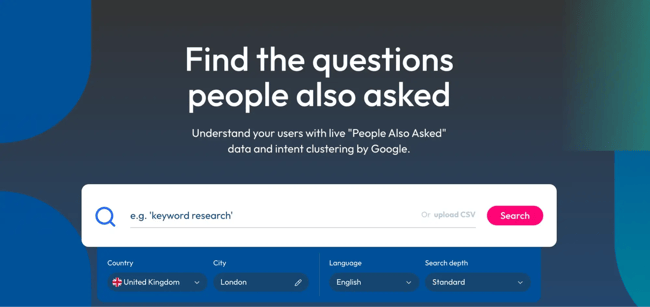
AlsoAsked scrapes Google’s “People Also Asked” data and presents it as a visual tree — showing how one question branches into related sub-questions. This is one of the most direct inputs for AEO content structure: the branches represent the natural follow-up prompts users ask after an initial query, which is close to how LLM fanout works.
What we like: The visual hierarchy makes it immediately obvious which questions are “parent” questions (likely your H2s) and which are sub-questions (your H3s and direct answers). It’s one of the tools I use almost every time I’m building an AEO content brief.
Best for: Mapping question hierarchies and understanding how people move from broad questions to specific follow-ups.
AnswerThePublic
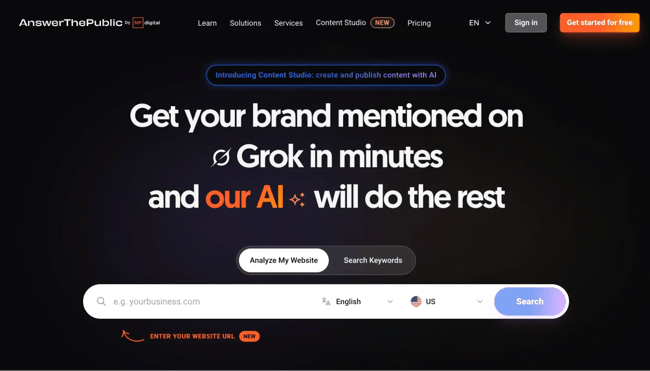
AnswerThePublic visualizes question-based and preposition-based queries around a seed keyword. It’s a fast way to generate a large pool of AEO candidates, organized by question type (what, how, why, can, will, etc.).
What we like: The export function makes it easy to pipe hundreds of question variants into a spreadsheet for prioritization. Pair it with Semrush or Ahrefs volume data to identify which questions actually have search demand.
Best for: Broad question discovery across a topic, especially for teams new to AEO who need to see the full landscape of what people ask.
Tools for Finding Fanout Queries
LLM query fan-outs reveal related prompts, comparisons, and follow-up questions triggered by a single input. When someone types “how do I choose a CRM” into ChatGPT, the model may internally generate and answer multiple sub-queries before surfacing a response.
Understanding that fanout is one of the most underutilized levers in AEO keyword research.
Question discovery tools surface people-first questions and long-tail prompts — fanout tools take that a step further by modeling how AI systems expand and interpret those questions.
Otterly.ai
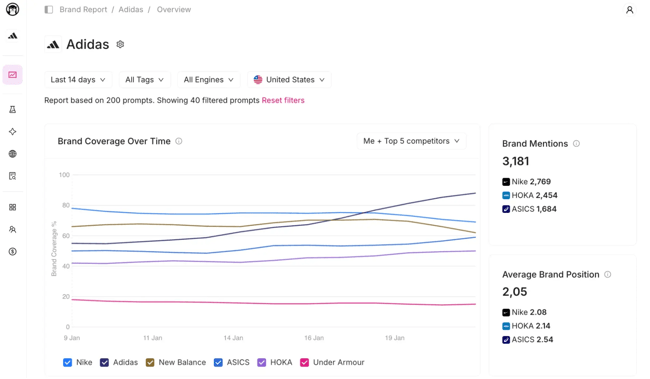
Otterly.ai monitors visibility across ChatGPT, Perplexity, and other answer engines. By tracking which prompts trigger your content’s inclusion, you can reverse-engineer the fanout clusters that matter most.
What we like: Otterly surfaces prompt visibility by platform — so you can see that you’re appearing in Perplexity for “best CRM for small teams” but not in ChatGPT for the same query. That gap analysis is directly actionable.
Best for: Teams that want to see how their brand and content show up across multiple AI platforms, and use that data to guide prompt targeting.
Dejan.ai

Dejan.ai offers tools for semantic analysis, entity mapping, and understanding how AI systems interpret content. Entity mapping improves content clarity and citation likelihood — and Dejan’s tools help you model those relationships before writing.
What we like: The entity-level analysis is more sophisticated than most tools in this category. If you’re serious about structured AEO content that AI systems can parse and cite confidently, Dejan.ai is worth exploring.
Best for: Advanced SEO and AEO practitioners who want to model semantic query expansion and understand how entities relate to each other in AI-generated answers.
Screaming Frog + Gemini
This pairing is one of my favorite DIY approaches to fanout query modeling. Use Screaming Frog to crawl your site and extract existing H2s, H3s, and meta descriptions.
Feed those into Gemini via the API (or Google AI Studio) with a prompt like: “What follow-up questions would users ask after reading about [topic]? List 10 specific, conversational questions.” The output gives you a synthetic fanout — an approximation of how AI models expand your current content’s topical footprint.
Pro tip: Run this process on your top-performing pages first. If a page already earns traffic or visibility for a topic, expanding its AEO coverage through fanout question integration is lower-effort than building from scratch.
Best for: Technical SEO teams who want to use existing crawl infrastructure to enrich content with AI-generated question expansion.
AEO Visibility Trackers
AEO trackers measure mentions, citations, and visibility across answer engines — filling the gap that traditional rank trackers leave completely empty. Competitive insights from these tools help you determine gaps in coverage — where competitors appear and which prompts brands are missing entirely.
HubSpot AEO Grader
The HubSpot AEO Grader supports a baseline answer engine visibility assessment — and it’s the tool I’d recommend to any team just starting to measure their AEO performance. It shows you how your brand appears across AI-powered search results, where you have authority, and where your content falls short.
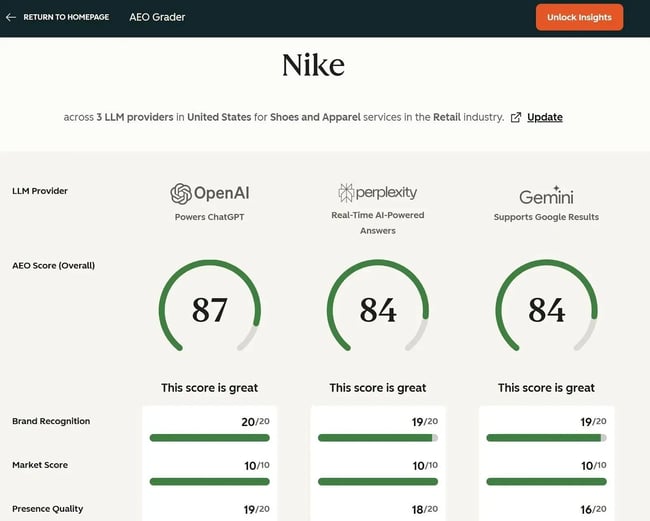
What we like: It’s free and delivers immediate clarity on answer engine visibility. Use it to gain leadership buy-in before committing to a broader investment in an AEO tool.
Best for: Teams that want a free, fast baseline assessment of their answer engine visibility before investing in a full AEO tool stack.
HubSpot AEO — Prompt Tracking & AI-Powered Suggestions
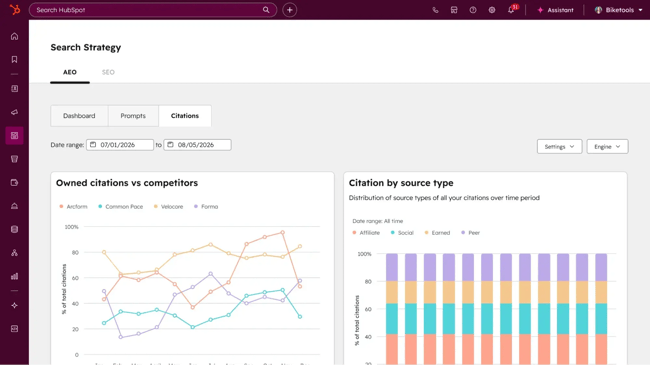
HubSpot’s AEO product includes prompt tracking that lets you monitor which questions your brand appears for across answer engines — and AI-powered suggestions that actively recommend new prompts and questions to track based on your existing visibility and content gaps.
This is the feature I find most valuable: the tool doesn’t just show you where you are — it tells you where to go next. It surfaces additional questions to monitor based on semantic similarity and competitor coverage, which effectively automates a significant portion of the fanout discovery process.
What we like: HubSpot AEO produces a single answer engine visibility score across ChatGPT, Perplexity, and Gemini, then translates the underlying data into plain-language recommendations any marketing team can act on without an AEO specialist on staff. The competitor comparison view makes citation gaps immediately obvious.
Best for: Marketing teams that want a fast baseline of their answer engine visibility plus a prioritized roadmap for closing the gaps, without stitching together multiple monitoring tools.
Marketing Hub Pro and Enterprise
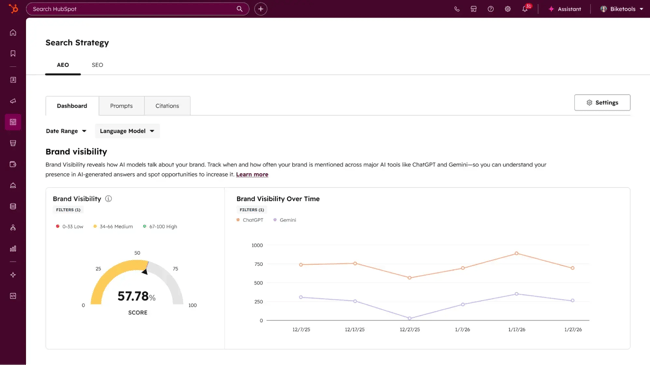
AEO is built into Marketing Hub Pro and Enterprise, which means the same visibility score, prompt tracking, and recommendations connect directly to the CRM, content, and reporting tools marketing teams already use. Because it draws from CRM data, prompt suggestions auto-tune to specific industries, competitors, and customer segments — and recommendations get sharper the longer the platform learns the business.
What we like: Teams can see their AEO gaps and seamlessly create content in Content Hub. Native integration means the different tools work together.
Pro tip: Set up prompt tracking for your top 10 to 15 primary AEO targets first. After 30 days, use the AI-powered suggestions to expand to the next tier of prompts.
Best for: Marketing teams that want their AEO research, tracking, and execution unified inside the platform already running their content and pipeline reporting. This staged approach keeps your tracking focused and actionable rather than overwhelming your team with hundreds of data points at once.
Tools for Ideating AI Prompts With Synthetic Query Generation
Synthetic query generation lets you approximate the range of prompts users might type into answer engines — without waiting for organic search data to accumulate. This is especially valuable for newer products, emerging categories, or topics that don’t yet have established search volume.
Claude
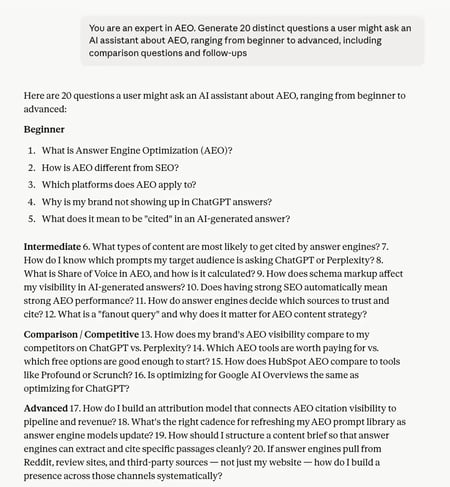
Claude is one of my go-to tools for generating synthetic queries.
A prompt like: “You are an expert in [topic]. Generate 20 distinct questions a user might ask an AI assistant about [topic], ranging from beginner to advanced, including comparison questions and follow-ups” produces a high-quality starting inventory.
The higoodie.com query fan-out methodology outlines a structured approach: start with query analysis to understand intent, then expand to related prompts, and finally map to content gaps. Claude handles all three stages well.
What we like: Claude is particularly good at generating comparative and consideration-stage queries — “Claude vs. ChatGPT for customer support,” “which CRM integrates best with HubSpot” — that reflect how real users prompt answer engines when making purchasing decisions.
Pro tip: After generating synthetic queries, test them directly in ChatGPT and Perplexity. Note which ones return AI-generated answers (versus a traditional results page) — those are your highest-priority AEO targets.
Best for: Generating rich synthetic prompt sets, modeling fanout queries, and validating whether your content directly answers the questions that answer engines are likely to field.
See our guide on AI SEO for more context on optimizing for AI-generated answers.
Step-by-Step Workflow to Find AEO Keywords
The tools above are only as useful as the workflow connecting them. Here’s the process I’d recommend for a team starting AEO keyword research from scratch — or auditing an existing program.
How to Use Autocomplete and People Also Ask for AEO
Step 1: Seed query identification.
Start with five to 10 core topics your brand owns or wants to own. These are typically product categories, use cases, or customer problems — not branded terms.
Step 2: Autocomplete expansion.
Type each seed topic into Google and capture autocomplete suggestions. These are real, high-frequency queries that often match answer engine prompt patterns. Focus especially on question-format autocomplete (“how do I,” “what is the best,” “why does”).
Step 3: People Also Asked mapping.
For each seed topic, search Google and take a screenshot of the “People Also Asked” box. Use AlsoAsked to expand this into a full question hierarchy. This gives you a two-level map: primary questions (what people ask first) and follow-up questions (what they ask next). Both matter for AEO.
Step 4: Prioritization.
Cross-reference your PAA question list with Semrush or Ahrefs to identify which questions have meaningful search volume. High-volume questions with AI Overview appearances in the SERP are your top AEO targets — they already have AI-generated answers, which means appearing in them is achievable with the right content.
How to Use LLM Query Fan-Outs to Expand Question Sets
Step 1: Query analysis.
Take your prioritized list of questions and group them by intent cluster. “What is X,” “How does X work,” and “X vs. Y” are different intent clusters that require different content treatments.
Step 2: Synthetic expansion.
Feed each cluster into Claude or ChatGPT with a fanout prompt: “A user asks: ‘[primary question]‘. What are 8 follow-up questions they might ask after receiving an answer?” Document the output.
Step 3: Cross-engine validation.
Test your top synthetic prompts in ChatGPT, Perplexity, and Gemini. Record which prompts generate AI-synthesized answers and which return standard links. AI-generated answer triggers are your AEO keywords.
Step 4: Gap analysis.
For each confirmed AEO target, check whether your site currently appears in the AI-generated answer. Use HubSpot’s AEO prompt tracking or Otterly.ai to systematize this. Gaps become your content roadmap.
Step 5: Content brief creation.
For each confirmed gap, create a content brief that includes:
- The core question (your H1/title)
- A direct answer in the first 50–100 words
- Supporting entities (related concepts, products, brands AI should associate with your answer)
- FAQ section addressing fanout questions
- Schema markup (FAQ or HowTo where applicable)
- Internal links to related content clusters
Content briefs for AEO should include the core question, direct answer, supporting entities, schema, and internal links. This is where the research workflow connects to execution — and where most teams drop the ball by keeping their AEO insights in a spreadsheet that never reaches the writer.
Frequently Asked Questions About Keyword Research Tools for AEO
Is AEO replacing SEO?
No, but AEO is expanding the scope of what SEO teams are responsible for. Traditional organic search isn’t disappearing — Google still serves billions of queries that return traditional results pages — but the share of queries resolved by AI-generated answers is growing, and that trend is accelerating.
Teams that treat AEO as a complement to SEO, not a replacement, are better positioned than those waiting to see which wins. The underlying skills overlap significantly — technical soundness, strong content, and authority signals matter in both worlds — but targeting, structure, and measurement diverge. For a deeper look at this shift, see our guide on answer engine optimization.
Can I use ChatGPT alone for AEO keyword research?
ChatGPT is a useful tool for synthetic query generation and fanout expansion, but it’s not sufficient on its own. It doesn’t provide search volume data, can’t track your answer engine visibility over time, and doesn’t show you where competitors appear.
Use it as a question-generation and validation layer on top of tools that provide real search data (Semrush, Ahrefs) and answer engine visibility tracking (HubSpot AEO, Otterly.ai). ChatGPT is a strong input to the research process; it’s not the research platform.
Which engine should I prioritize first for AEO?
Start with Google AI Overviews. Google still holds the largest share of global search traffic, and AI Overviews are appearing for an expanding range of commercial and informational queries. Appearing in a Google AI Overview often requires meeting the same E-E-A-T standards that traditional Google ranking does — so existing SEO investment carries over more directly. See our guide on Google E-E-A-T for what’s required to earn that trust.
Once the team has a baseline Google AEO program, expand to Perplexity (strong with researchers and technically sophisticated users) and ChatGPT (relevant for purchase consideration and comparison queries). Multi-engine coverage is a reasonable goal within 6 to 12 months — but it’s not where most teams should start.
How often should I refresh AEO keyword research?
More frequently than traditional SEO research. Answer engines regularly update their indexing and answer generation, and new fanout patterns emerge as user behavior evolves. My recommendation: run a full AEO keyword audit quarterly and review prompt-tracking data monthly.
If you’re using a tool like HubSpot’s AEO product with AI-powered suggestions, let the tool flag emerging prompt opportunities between formal review cycles. The worst outcome in AEO is building content for questions that answer engines have stopped answering — so staying current with your prompt coverage is an ongoing operational requirement, not a one-time project.
What budget should I plan for AEO tools?
It depends on team size and maturity. An exploratory stack under $500 per month can combine free tools like the HubSpot AEO Grader, Google Search Console, and AnswerThePublic’s free tier with AlsoAsked ($15–49 per month) and Claude Pro ($20 per month) — enough to cover question discovery, fanout generation, and basic visibility checking.
A growth-stage stack of $500–$2,000 per month typically adds Semrush or Ahrefs ($120–$500 per month, depending on tier), Otterly.ai for answer engine tracking, and HubSpot AEO for integrated prompt tracking and suggestions. The biggest mistake teams make is investing in a six-figure stack before the workflow to act on the data is built — start with the minimum viable tool set, prove the process works, then scale up. See our roundup of the best rank trackers for more on AI-integrated rank monitoring.
How to Choose Your AEO Keyword Research Stack
AEO keyword research isn’t one job — it’s three. Discovering the questions buyers ask, modeling how AI answer engines expand those questions into fanout prompts, and tracking which prompts the brand actually appears for. No single tool covers all three categories well, which is why the right stack matters more than any single platform.
For teams that want a unified starting point, HubSpot AEO consolidates the visibility, tracking, and recommendation layers in one place. It produces a single answer engine score across ChatGPT, Perplexity, and Gemini, shows which prompts cite competitors instead of the brand, and delivers prioritized, plain-language recommendations starting at $50 per month. Marketing Hub Pro and Enterprise extend that with CRM-powered prompt suggestions that help teams address gaps.
The fastest way to see where the brand stands today is the free HubSpot AEO Grader. It’s a baseline check, not a commitment — and it’s the cleanest first step into a structured AEO program.